Voicemail is a convenient feature that allows callers to leave you messages when you’re unavailable. In this step-by-step guide, I will walk you through the process of set up voicemail on iPhone 15 Pro Max, as well as customizing your greeting and managing your voicemail settings.
Setting up voicemail on the iPhone 15 Pro Max
Setting up voicemail on your iPhone 15 Pro Max is a straightforward process. Follow these simple steps to get started:
- Open the Phone app.
- Tap Voicemail in the bottom-right corner.
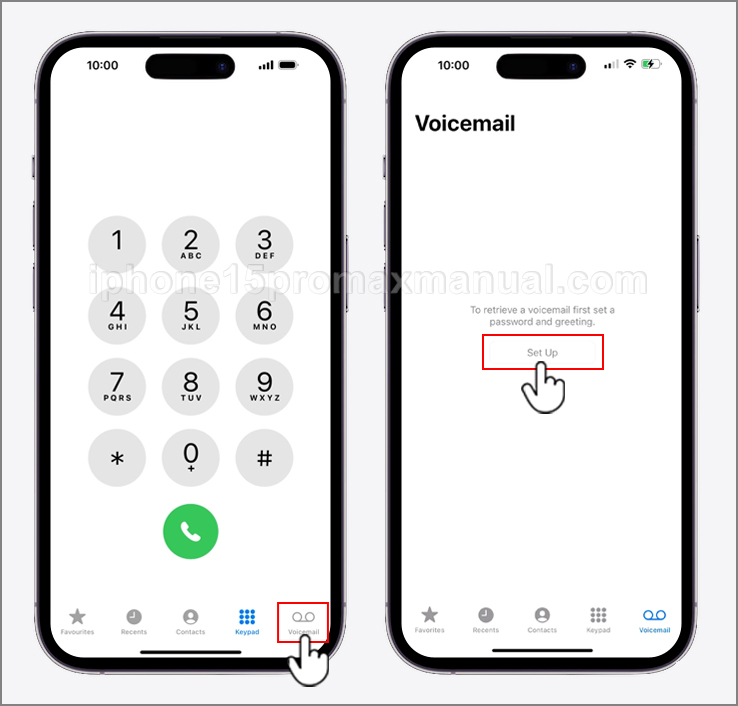
- Tap Set Up Now.
- You’ll need to create a Password by typing one in the text field and then confirming it.
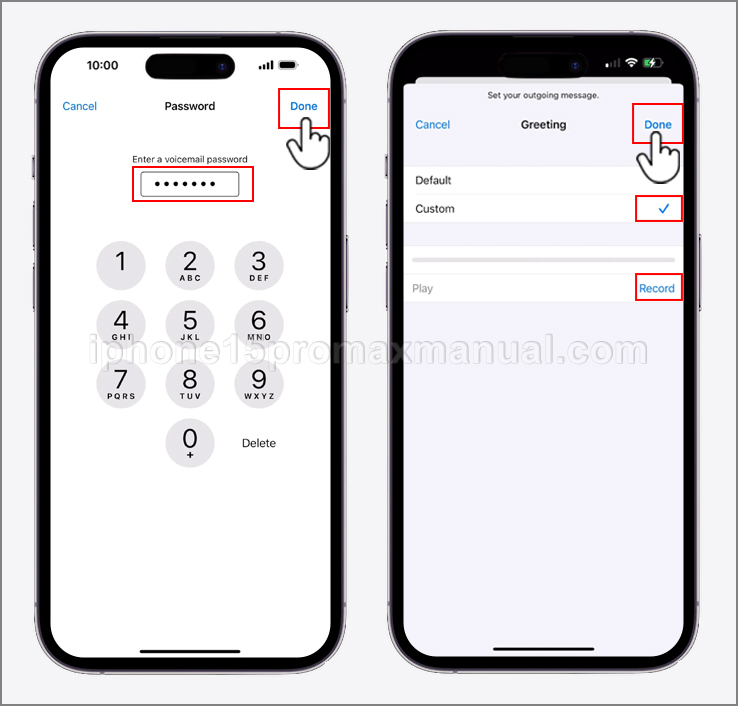
- When that’s completed, tap Done in the top right-hand corner.
Congratulations! You have now successfully set up voicemail on your iPhone 15 Pro Max. It’s important to note that some carriers may require additional steps or have different procedures for setting up voicemail.
If you encounter any issues during this process, I will address common troubleshooting tips later in this guide.
Accessing the Voicemail Feature on your iPhone 15 Pro Max
Now that you have voicemail set up on your iPhone 15 Pro Max, it’s essential to know how to access your messages. Here’s how you can do it:
- Open the Phone app on your iPhone.
- Tap on the Voicemail tab located at the bottom-right corner of the screen.
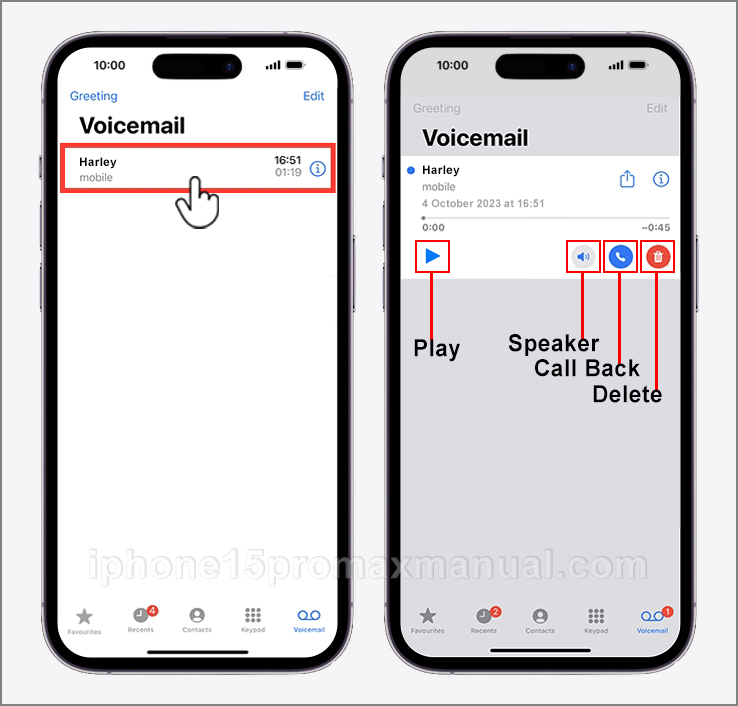
- You will see a list of your voicemail messages. Tap on the message you want to listen to.
To make it even more convenient, you can also access your voicemail messages from the lock screen. When you have a new voicemail, a notification will appear, allowing you to tap on it and listen to your message without unlocking your iPhone.
Customizing your Voicemail Greeting on your iPhone 15 Pro Max
Personalizing your voicemail greeting adds a nice touch and lets callers know they’ve reached the right person. Follow these steps to customize your voicemail greeting on your iPhone 15 Pro Max:
- Open the Phone app on your iPhone 15 Pro Max.
- Tap on the Voicemail tab located at the bottom-right corner of the screen.
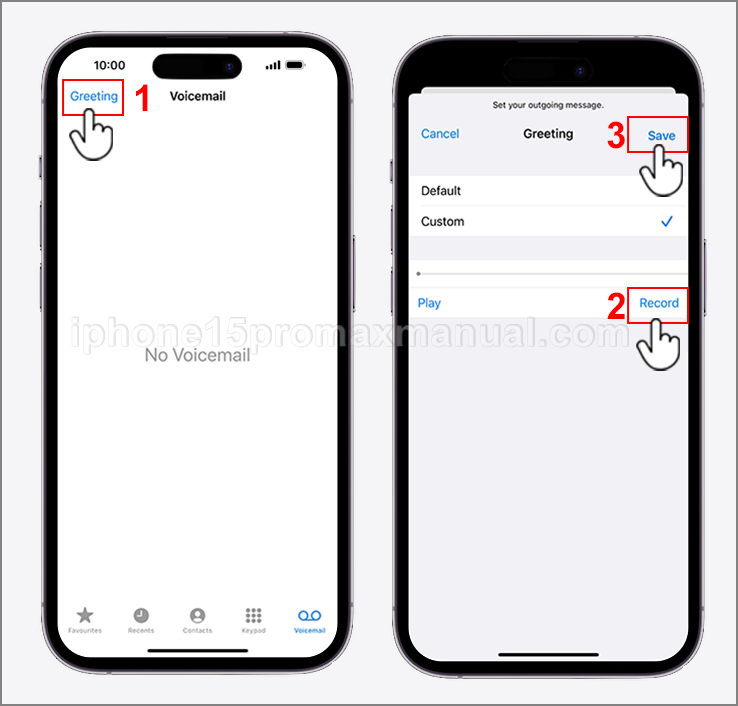
- Tap on the Greeting option.
- You can either use the default greeting or record a custom one by tapping on Custom.
When recording a custom greeting, make sure to speak clearly and provide any necessary information, such as your name or alternate contact methods. Remember, your voicemail greeting represents you, so it’s important to make a good impression.
Troubleshooting common voicemail issues
While setting up voicemail on your iPhone 15 Pro Max is usually a smooth process, you may encounter some issues along the way. Here are some common problems and their solutions:
- Forgot Voicemail Password: If you’ve forgotten your voicemail password, contact your carrier’s customer support to reset it.
- Voicemail Not Working: If you’re having trouble accessing or receiving voicemail messages, restart your iPhone and check for any carrier updates.
- Voicemail Won’t Play: If your voicemail messages won’t play, ensure that you have a strong cellular or Wi-Fi connection. If the issue persists, contact your carrier for assistance.
If you’re still experiencing issues after trying these troubleshooting steps, reach out to your carrier’s customer support for further assistance tailored to your specific situation.
Additional tips and tricks for using Voicemail
Now that you have a solid understanding of how to set up and manage voicemail on your iPhone 15 Pro Max, here are some additional tips and tricks to enhance your voicemail experience:
- Forward Voicemail: You can forward voicemail messages to other contacts by tapping on the share button within the voicemail message.
- Delete Voicemail: To delete voicemail messages, swipe left on the message and tap the “Delete” button.
- Save Voicemail: If you have an important voicemail message you want to save, tap on the share button and save it as an audio file.
By utilizing these tips and tricks, you can make the most of the voicemail feature on your iPhone 15 Pro Max and streamline your communication process.
Conclusion
Setting up voicemail on your iPhone 15 Pro Max is a simple process that ensures you never miss an important message. By following this step-by-step guide, you have now learned how to set up voicemail, access your messages, customize your greeting, manage settings, troubleshoot common issues, and utilize additional tips and tricks.
Remember to explore the various options available and tailor them to your preferences. With voicemail properly set up, you can confidently navigate through your busy schedule knowing that you can stay connected even when you’re unavailable.