If you’re an iPhone 15 Pro Max user, you may have heard about optimized battery charging. But what is it, and how does it work? This article covers battery health and also optimized battery charging on iPhone 15 Pro Max.
How does Optimized Battery Charging work on iPhone
Optimized Battery Charging is a feature available on iOS 13 and later that is designed to reduce the wear on your iPhone’s battery and improve its lifespan by reducing the time your iPhone spends fully charged.
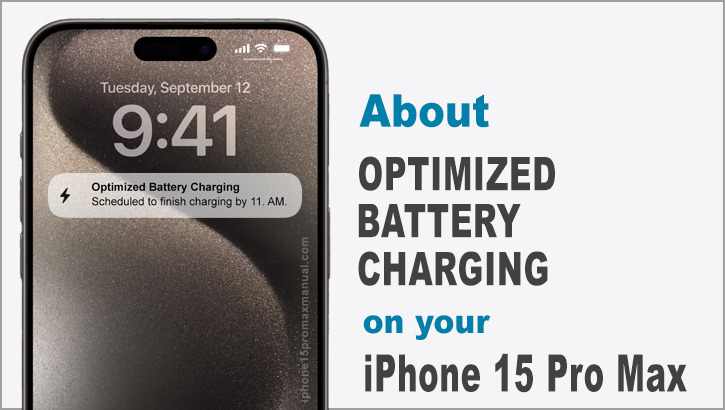
When enabled, your iPhone will delay charging past 80% in certain situations. Your iPhone uses on-device machine learning to learn your daily charging routine so that optimized battery charging activates only when your iPhone predicts it will be connected to a charger for an extended period of time.
This feature stops charging at 80% and will only charge the remaining 20% at a predetermined time, depending on when you wake up.
When optimized battery charging is active, a notification on the lock screen says when your iPhone will be fully charged. If you need to have your iPhone fully charged sooner, you can touch and hold the notification and then tap Charge Now.
Optimized Battery Charging needs at least 14 days to learn your charging habits, so it won’t engage before then. Also, your iPhone needs to experience at least 9 charges of 5 hours or more in a given location for the feature to activate.
Does the iPhone 15 Pro Max have optimized battery charging?
Yes, the iPhone 15 Pro Max has optimized battery charging. When this feature is turned on, your iPhone will sometimes stop charging after 80%.
Your iPhone uses on-device machine learning to learn how you charge it every day.
What is the point of optimized charging?
The point of optimized battery charging is to extend the lifespan of your iPhone’s battery and reduce the need for battery replacements.
Optimized Battery Charging is designed to reduce the wear on your battery and improve its lifespan by reducing the time your iPhone spends fully charged.
How to turn on optimized battery charging
To turn on or off optimized battery charging on your iPhone, follow these steps:
- Open the Settings app on your iPhone.
- Scroll down and tap on “Battery“.
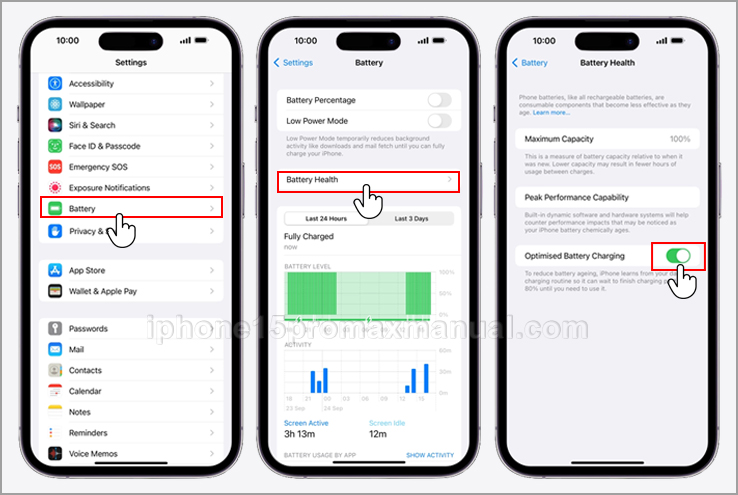
- Tap on “Battery Health & Charging“.
- Toggle the switch next to “Optimized Battery Charging” to turn it on or off.
Is it good to turn on optimized battery charging on my iPhone?
Yes, it is good to turn on optimized battery charging on your iPhone 15 Pro Max. This feature can help extend the lifespan of your battery and reduce the need for battery replacements.
When optimized battery charging is active, a notification on the lock screen says when your iPhone will be fully charged.
To charge your iPhone faster, press and hold the notification and tap Charge Now.
How do I keep my iPhone 15 Pro Max’s battery healthy?
Here are some tips to keep your iPhone 15 Pro Max’s battery healthy:
- Enable Optimized Battery Charging: Turn on Optimized Battery Charging in Settings > Battery > Battery Health to prolong battery life.
- Avoid severe temperatures: Do not charge or leave your iPhone in hot conditions, including direct sunlight. Extreme temperatures destroy iPhone batteries.
- When storing your iPhone, keep it half-charged: When storing your iPhone, keep it half-charged to extend the battery life.
- Use original or Apple-certified accessories to charge your iPhone: Using non-certified accessories can damage your iPhone’s battery health.
- Check iPhone battery health regularly: Check your iPhone’s battery capacity, peak performance, and service needs in Settings > Battery > Battery Health & Charging.
You can extend the battery life of your iPhone 15 Pro Max by following these instructions.
Benefits of turning on optimized battery charging
- Increased battery life: Optimized battery charging can extend the life of your iPhone’s battery and reduce battery replacements.
- Enhanced battery charging: The lock screen also alerts you when your iPhone is fully charged. To charge your iPhone faster, press and hold the notification and tap Charge Now.
Conclusion
Optimized battery charging helps iPhone 15 Pro Max users prolong battery life and reduce battery replacements. Optimized battery charging can delay iPhone battery aging and increase battery health by minimizing charging time.
2 thoughts on “How to Enable and Use Optimized Battery Charging on iPhone 15 Pro Max”